Travel between shifts: 7 ways to cut the minutes without cutting care

Mobile NDIS care happens in participants' homes, so time on the road is part of the job. The challenge for providers is planning for it and keeping track, to ensure it doesn't cause profit leaks.
Visualcare's first quarterly Care Sector Benchmark report is built from anonymised provider data (not survey answers). It looked at how much time staff spend travelling between shifts, amongst other factors including average participant earnings and participant volatility.
In short: What the benchmark found
Across providers using Visualcare's travel tracking features:
- NDIS: the middle half of providers average 12.7 to 23.7 minutes of travel between shifts, with a median of 17.7 minutes (105 providers)
- Support at Home: the middle half average 13.7 to 20.2 minutes, with a median of 16.9 minutes (115 providers)
- Short trips still take time: in Support at Home, even short distances take around 15 minutes
The middle half is the typical range. It leaves out the quarter of providers with the shortest average travel times and the quarter with the longest, so a few outliers don't skew the picture.
Travel shows up in both schemes, at similar levels. It's a structural feature of a distributed workforce delivering care in people's homes.
Learn more: NDIS management software for providers
Why NDIS travel time matters
Take an NDIS care worker with three between-client trips a day, spending the benchmarked median travel time on the road. That's close to an hour a day, or four and a half hours a week. Multiply that across your workforce and travel becomes one of your largest labour costs that doesn't involve the actual delivery of care.
Neither funding scheme fully covers it. NDIS allows travel to be claimed within caps, such as up to 30 minutes in metro areas. In Support at Home, travel has to be built into the unit price. Meanwhile, travel between clients is generally paid working time under the SCHADS Award, so the gap between what you pay and what you recover comes out of your margin.
There's a second cost: running late. When the roster doesn't allow enough time between visits, delays stack up through the day. Participants have to wait, routines and trust are disrupted, and staff feel the pressure of always running behind.
The good news is that most travel time can be factored in when the roster is built: which staff member, in what order, from where. That makes it controllable.
Read more: NDIS Travel Time: Paid in Full, Claimable in Part
7 practical ways to reduce care worker travel time
1. Know your own baseline
Start by comparing your figures with Visualcare's benchmark data. If your care workers' average travel time between shifts sits well above 24 minutes, your roster is worth a closer look. If it sits well below 13 minutes, check that it's being recorded accurately.
A flat figure in your reports is a warning sign that you may not be tracking data correctly. Some providers record the same travel time for every shift, such as 15 minutes, regardless of where staff are going. This is a problem because you can't control a cost you estimate rather than measure.
2. Map your participants and staff before you roster
Before assigning a shift, look at where your participants and staff are located. Using a tool with a map view shows at a glance which staff members live closest to a participant and where your service area has gaps in coverage.
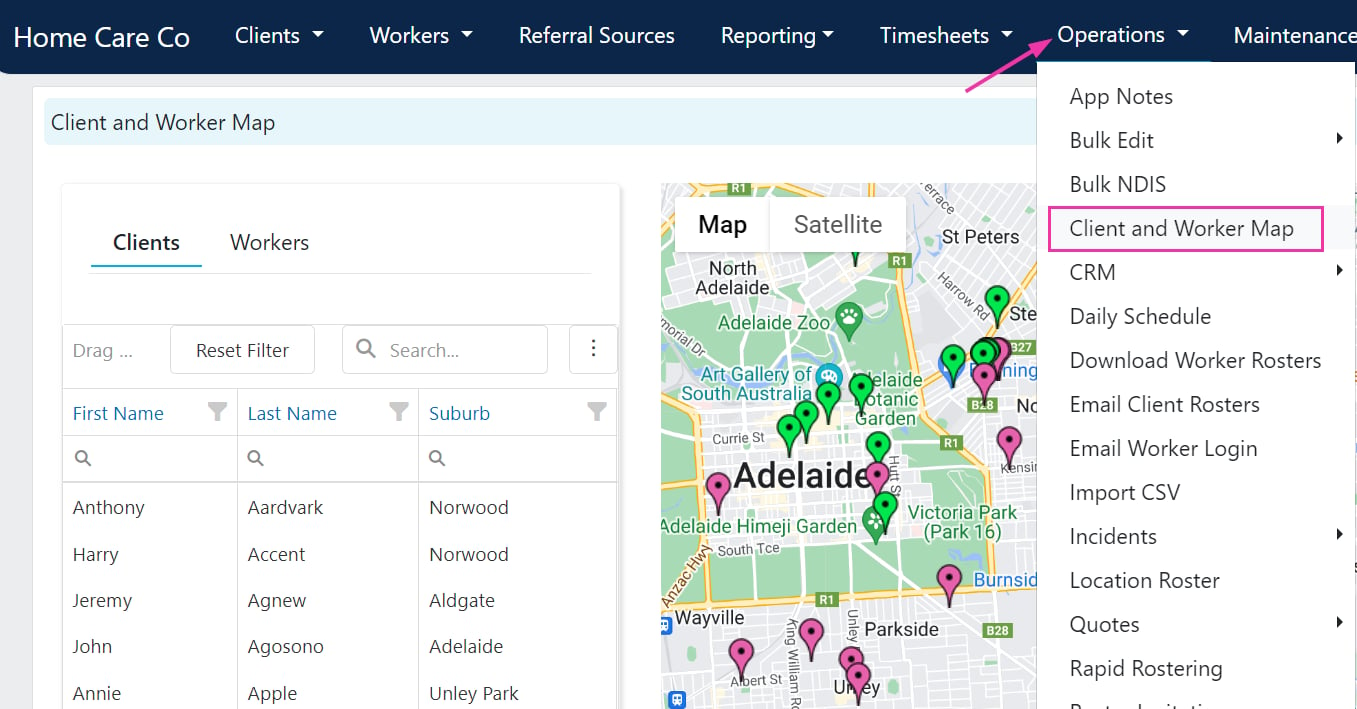
Matching the right person to the right participant includes where they are. When skills and availability are equal, the closer staff member is usually the better choice.
3. Cluster shifts by area
Grouping shifts by location, not only by availability, is one of the easiest ways to reduce between-shift travel minutes.
Look for patterns that waste time:
- Shifts scattered across a service area that could be grouped together
- Staff going back and forth between the same suburbs in one day
- Two staff members driving past each other to reach each other's participants
4. Sequence the day as a route
Once shifts are clustered, put them in an order that makes sense on a map. Plan each staff member's day as a route, starting near their home and moving logically from one participant to the next.
5. Be realistic
Keep traffic in mind; some trips will inevitably take longer in the morning, during the school run and during the evening peak hour.
Allow enough time for the actual journey, with extra in areas you know are congested. A realistic roster is fairer on your carers and the participants they support.
6. Log travel accurately, every time
Travel that isn't recorded can't be claimed, paid correctly or improved. Capture both types of kilometres:
- Between-visit kilometres: the distance from one participant to the next
- Transport kilometres: the distance travelled while transporting a participant
With the right app, your team can add travel notes and record kilometres against a specific client where needed.
Keep travel and service time as separate line items on invoices and claims. It's a compliance requirement for NDIS, and it gives you clean data to review.
7. Watch for patterns
Look back over a few weeks of travel records and late or missed appointments. You'll often find a handful of causes behind most of the problems: one difficult route, an overbooked staff member, or an appointment that's always too tight to make it to on time.
Ask your staff too. They know which trips and appointments they are always late for and why. Treat it as problem-solving, not a performance issue, and you'll hear about issues sooner.
Plan for and track care worker travel times with Visualcare
Visualcare's rostering tools bring travel into view at the planning stage, before shifts are locked in.
- Client and worker map: see participants and staff on a map, find who lives closest, plan rosters to minimise travel and review coverage across your service area.
- Automatic between-visit kilometres: calculated from client addresses and shift timing, so you're working with recorded distances, not estimates.
- Transport kilometres in the app: staff log the distance travelled with a participant when they complete their shift.
- Travel settings: manage how travel time and between-visit kilometres are charged and paid, so your roster, payroll and claims tell the same story.
Tired of spreadsheets? Visualcare brings travel into view as part of the roster-building process and helps with tracking and reporting. Book a demonstration today.
Request a Demo
Let us show you how Visualcare can work for your care organisation.